Google Block Breaker Game
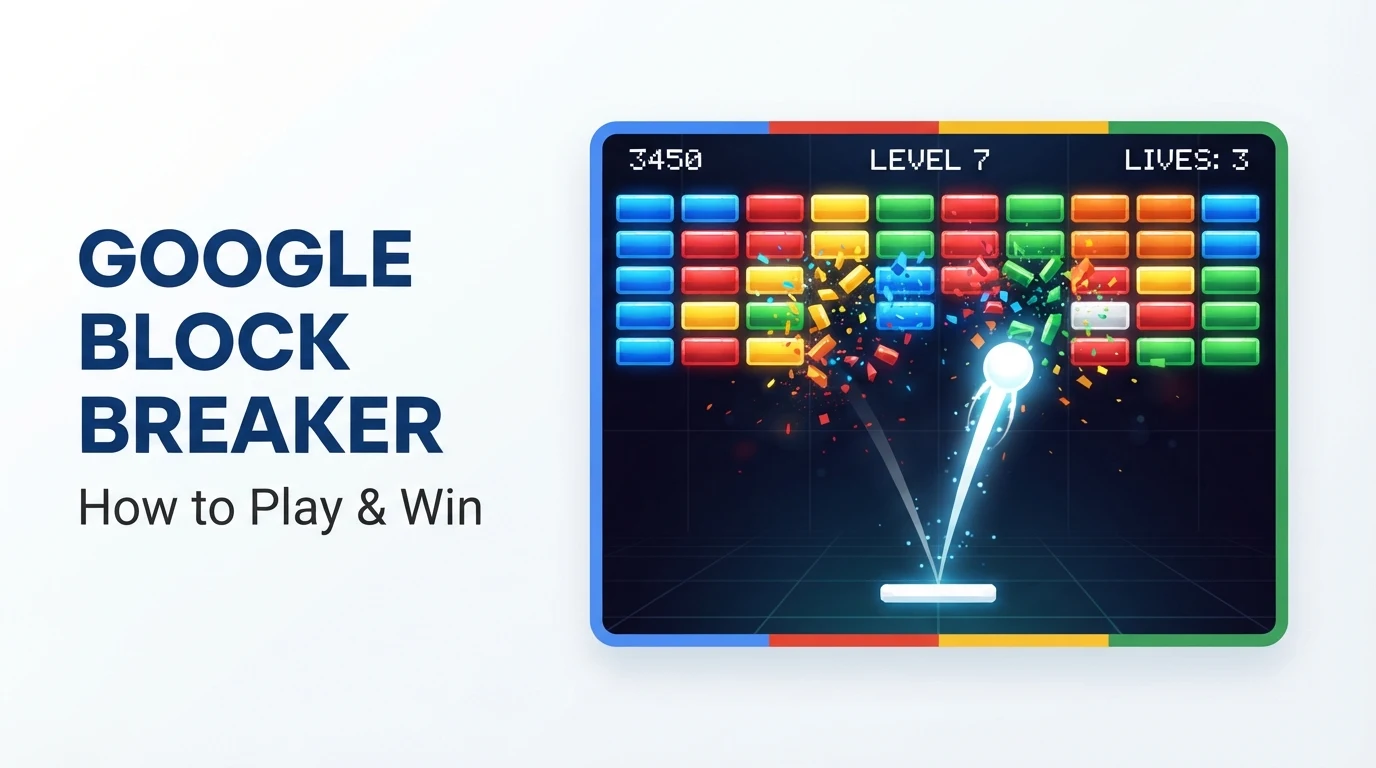
Google Block Breaker is a simple, fast, and surprisingly addictive hidden game inspired by the classic brick-breaker arcade genre. Instead of downloading an app or visiting a separate gaming website, you can access the game directly through Google Search on a supported browser. Once it appears, you control a paddle, bounce a ball into a wall of colorful blocks, and try to clear every block before losing all of your lives.
The game is easy enough for beginners to understand within seconds, but it becomes more challenging as the ball speeds up, blocks become harder to reach, and every missed bounce costs you a life. That balance between simplicity and increasing difficulty is exactly why Block Breaker remains so popular among casual players, students, office workers taking a short break, and fans of retro-style browser games.
In this guide, you will learn what Google Block Breaker is, how to play it, the best controls for desktop and mobile devices, useful strategies for higher scores, and why this little browser game has become such a widely searched online pastime.
What Is Google Block Breaker?
Google Block Breaker is a browser-based mini-game built around the familiar mechanics of traditional brick-breaker games. The player controls a paddle at the bottom of the screen and uses it to keep a ball in play. The ball travels upward, hits blocks arranged in rows, and destroys the blocks it strikes. When every block is cleared, the player advances to the next stage.
The concept is not new. Brick-breaker games have existed for decades, with early arcade titles popularizing the idea of using a paddle to bounce a ball into destructible targets. Google’s version gives that classic formula a clean, modern look while keeping the gameplay simple and accessible. There are no complicated rules, no long tutorials, and no need to create an account.
What makes Google Block Breaker especially appealing is that it is designed as a quick-play experience. You can start a game in seconds, play for a few minutes, and return to whatever you were doing. But because each run feels just short enough to try “one more time,” it can easily turn into a longer session than you planned.
How to Play Google Block Breaker
The goal of Google Block Breaker is straightforward: clear all the blocks on the screen without letting the ball fall below your paddle. Each time the ball passes your paddle and reaches the bottom of the play area, you lose a life. Once you run out of lives, the game ends and you can start again.
Basic Gameplay Steps
- Start the game: Search for “Block Breaker” in Google Search and select the playable game option if it appears.
- Launch the ball: Use the launch control to send the ball toward the blocks.
- Move the paddle: Slide the paddle left or right to intercept the ball.
- Break the blocks: Each successful hit removes a block from the wall.
- Clear the level: Destroy all visible blocks to move on to the next arrangement.
- Protect your lives: Avoid letting the ball fall past the paddle.
Although the rules are simple, mastering the game requires timing, patience, and control. The paddle is not just a defensive tool; it is also the main way to aim the ball. Where the ball strikes the paddle determines the angle of its rebound. A center hit usually sends the ball upward in a more direct path, while an edge hit sends it outward at a sharper angle.
Controls on Desktop and Mobile
Google Block Breaker supports different control methods depending on the device you are using. The game is designed to work smoothly on both desktop computers and mobile screens, making it convenient for quick entertainment anywhere.
Desktop Controls
- Mouse: Move the mouse left or right to control the paddle.
- Keyboard arrow keys: Use the left and right arrow keys for precise paddle movement.
- Spacebar: In many versions, the spacebar is used to launch the ball or perform an action when available.
Mouse control is often the easiest option for new players because it feels natural and allows quick reactions. Arrow keys can be useful when you want more controlled, deliberate movement, especially during faster levels.
Mobile Controls
- Swipe or drag: Move your finger left or right across the screen to guide the paddle.
- Tap: Tap the screen to launch the ball when the game prompts you.
Mobile play is ideal for short sessions, but it can be slightly harder to control during high-speed rallies. Keeping your finger close to the paddle and making small movements rather than large swipes can help you maintain better accuracy.
Why Google Block Breaker Is So Addictive
The appeal of Google Block Breaker comes from its perfect mix of simplicity, challenge, and instant feedback. You do not need to learn complex controls or memorize complicated strategies. Within a few seconds, you understand the objective: keep the ball alive and break the blocks.
However, the game becomes more interesting as you progress. The ball may move faster, the block layout may change, and you may need to plan angles more carefully. Every successful bounce gives immediate visual feedback, while every missed paddle creates a small moment of frustration that encourages you to try again.
This creates a classic gameplay loop: start a run, improve slightly, lose near the end, and immediately want another attempt. The short game sessions make it ideal for a quick break, while the desire to beat your previous score keeps players coming back.
Best Strategies to Score Higher
While Block Breaker looks like a game of luck at first, skilled players can significantly improve their results by controlling angles and planning ahead. Here are some practical strategies to help you last longer and clear more blocks.
1. Control the Ball’s Angle
Do not simply chase the ball. Instead, think about where you want it to go after it hits your paddle. Catching the ball with the center of the paddle creates a more vertical bounce, while using the edge sends it diagonally. Use angled hits to reach blocks that are difficult to access with straight shots.
2. Open a Path Along the Top
One of the most effective techniques in brick-breaker games is to create a channel along one side of the block wall. Once the ball can travel above the blocks, it can bounce repeatedly between the top of the screen and the remaining blocks, destroying several targets without requiring you to make difficult returns.
3. Stay Centered When Possible
It is tempting to follow the ball everywhere, but constantly moving from one side to the other can leave you out of position. Try to return to the middle after each hit. This gives you a better chance to reach balls traveling in either direction.
4. Make Small Movements
Large, sudden paddle movements often cause missed timing. Small adjustments are usually more effective, especially when the ball is moving quickly. Focus on positioning the paddle slightly before the ball arrives rather than reacting at the last second.
5. Watch the Ball, Not Just the Paddle
Beginners often focus only on their paddle. Instead, keep your eyes on the ball’s path and anticipate where it will land. The earlier you predict its direction, the more time you have to move into position.
6. Use Power-Ups Wisely
Some versions of the game include falling power-ups or special effects after certain blocks are destroyed. These can slow the ball, expand the paddle, add extra balls, or provide other helpful advantages. Move your paddle under useful power-ups when it is safe, but do not risk losing the ball just to collect one.
Common Mistakes Beginners Make
Many players lose early not because the game is too difficult, but because of a few common habits. Avoiding these mistakes can immediately improve your performance.
- Moving too late: Waiting until the ball is close to the paddle makes it harder to react.
- Using only straight bounces: Straight shots are safe, but angled shots are often necessary to clear difficult blocks.
- Ignoring the edges: The sides of the play area can help redirect the ball toward blocks you cannot reach directly.
- Chasing power-ups recklessly: A power-up is only useful if you can collect it without losing control of the ball.
- Playing too quickly: Block Breaker rewards calm timing more than frantic movement.
Is Google Block Breaker Free?
Yes, Google Block Breaker is free to play when it is available through Google Search. There is no purchase required, no subscription, and no need to install additional software. Because it runs in the browser, it is accessible on compatible desktop and mobile devices without taking up storage space.
Availability can vary by region, browser, device, and Google’s ongoing experiments. If the game card does not appear when you search for it, try using an updated browser, clearing your search history, or searching with slightly different terms such as “Block Breaker game” or “Brick Breaker.”
Who Should Play Google Block Breaker?
Google Block Breaker is suitable for almost anyone who enjoys simple, casual games. It is especially appealing to:
- Students: A quick game during a study break.
- Office workers: A short distraction between tasks.
- Retro gaming fans: Players who enjoy classic arcade-style mechanics.
- Mobile gamers: People who prefer games that do not require downloads.
- Competitive players: Anyone trying to improve their high score.
Because the game does not require advanced gaming skills, it is also a good option for people who rarely play video games. The controls are intuitive, the objective is clear, and each round offers an immediate sense of progress.
Google Block Breaker vs. Traditional Brick-Breaker Games
Google Block Breaker follows the same basic formula as traditional brick-breaker games, but its accessibility makes it stand out. Traditional arcade versions often required coins, physical machines, or downloadable software. Google’s version brings the concept directly into the search experience.
| Feature | Google Block Breaker | Traditional Brick-Breaker Games |
|---|---|---|
| Access | Available through Google Search when offered | Often requires an arcade machine, app, or download |
| Cost | Free | May require payment or purchase |
| Controls | Mouse, keyboard, or touchscreen | Varies by platform |
| Session length | Quick and casual | Can range from short to extended |
| Learning curve | Very easy | Usually easy, but may vary |
Frequently Asked Questions
What is Google Block Breaker?
Google Block Breaker is a hidden browser mini-game inspired by classic brick-breaker arcade games. Players move a paddle to bounce a ball into blocks and clear the screen.
How do I play Google Block Breaker?
Search for “Block Breaker” in Google Search. If the playable game appears, select it and use your mouse, arrow keys, or touchscreen to move the paddle and keep the ball in play.
Is Google Block Breaker free?
Yes. The game is free and does not require an app download or account creation when available through Google Search.
Can I play Google Block Breaker on mobile?
Yes. On compatible mobile devices, you can usually move the paddle by dragging or swiping your finger across the screen.
What happens if the ball falls?
You lose a life. When all lives are gone, the game ends and you can start a new run.
How do I get a higher score?
Focus on controlling bounce angles, creating a path along the top of the block wall, making small paddle movements, and collecting useful power-ups safely.
Why can’t I find the game in Google Search?
If you enjoy quick online games, you may also like our detailed Gimkit Vs Blooket comparison, which explains which classroom quiz game is better for students and teachers.
If you want to create your own simple browser-style games after playing Block Breaker, explore our beginner-friendly guide to Scratch Games For Beginners, featuring easy game ideas kids can build without typing code.
Looking for more quick entertainment? Browse our collection of Play Free Online Games and discover more browser games you can enjoy without downloading anything.
If you enjoy discovering creative browser-based experiences, check out our curated list of Games To Play On Neal Fun, featuring fun interactive websites and mini-games worth trying.
Final Thoughts
Google Block Breaker proves that a game does not need complicated graphics, deep storylines, or advanced controls to be fun. Its simple paddle-and-ball formula delivers fast entertainment, a satisfying challenge, and the timeless appeal of classic arcade gaming.
Whether you are playing for thirty seconds or trying to beat your personal best, the game offers an easy way to relax and test your reflexes. Learn to control the ball’s angle, stay calm under pressure, and use the edges of the screen to your advantage. With a little practice, you will start clearing levels more consistently and enjoying every fast-paced rally.
If you enjoy quick browser games, Google Block Breaker is definitely worth trying. It is free, easy to learn, and just challenging enough to keep you coming back for one more round.
About the Author